
TOSCA Automation with SAP GUI, S/4HANA & API Testing & Agentic AI– Complete Hands-on Course with Real-Time Projects
(Tosca, SAP GUI & SAP S4 HANA Fiori Automation, API Testing, Agentic AI XScan, Test Cases, TCD,
Excel Integration, Conditional Logic, Recovery Scenarios, Certification, Real-Time Project Practice)
This comprehensive SAP Test Automation course using Tricentis Tosca is designed to help you master end-to-end SAP automation testing with real-time business scenarios. The program covers core concepts of SAP ERP, SAP S/4HANA, SAP GUI navigation, and business process workflows, followed by advanced TOSCA automation techniques.
You will gain hands-on experience in model-based test automation (MBTA), SAP GUI automation, test case design (TCD), and data-driven testing using Excel and TDS (Test Data Services). The course also includes advanced topics such as API testing, JSON/XML validation, PDF comparison, distributed execution (DEX), and Tosca Query Language (TQL).
Learn to build scalable automation frameworks using reusable modules, libraries, recovery scenarios, and self-healing automation, ensuring minimal maintenance and high efficiency. You will also explore qTest integration, AI-driven test automation, and real-time debugging techniques used in enterprise SAP projects.
Badges Preparation Supported in the Course
Our training provides guidance and support for the following Tricentis Tosca badges:
- Tricentis Tosca Fundamentals- Automating web application testing– AS1
- Tricentis Tosca Fundamentals- optimizing Test Automation with centralized Test Data–AS2
- Tricentis Tosca Deep Dive–Automating beyond Web application–AE1
- Tricentis Tosca Deep Dive–Structuring your test cases and test data– TDS1
- Tricentis Tosca Deep Dive–Managing your stateful data– TDS2
- SAP Certification with TOSCA.
About the Instructor:
|
Prakash is an experienced SAP Automation Specialist with over 7 years of hands-on expertise in implementing automation frameworks using Tricentis TOSCA across SAP GUI, Fiori, and Salesforce environments. He has worked extensively on model-based automation, reusable module design, and data-driven test execution for enterprise systems. As a trainer, Prakash focuses on practical, project-oriented learning, helping learners master real-time SAP automation scenarios such as dynamic element handling, pop-up management, and Excel-driven workflows. His teaching style emphasizes clarity, hands-on guidance, and industry readiness—enabling students to confidently build and execute end-to-end SAP automation solutions using TOSCA. Over the years, he has successfully delivered 15+ batches and trained more than 350+ students, helping many of them upskill and advance their careers. |
Sample Videos:
TOSCA Automation with SAP GUI, S/4HANA, API Testing & Agentic AI – Complete Hands-on Course with Real-Time Projects- Live Training – Demo video Recording
TOSCA Automation with SAP GUI, S/4HANA, API Testing & Agentic AI – Complete Hands-on Course with Real-Time Projects- Live Training – Day1 video Recording
Live Sessions Price:
For LIVE sessions – Offer price after discount is 300 USD 259 99 USD Or USD13000 INR 12900 INR 7900 Rupees
OR
Free Day 2 Session:
3rd June @ 9:00 PM – 10:00 PM (IST) (Indian Timings)
3rd June @ 11:30 AM – 12:30 PM (EST) (U.S Timings)
3rd June @ 4:30 PM – 5:30 PM (BST) (UK Timings)
Day 2 Class Schedule:
For Participants in India: Monday to Friday @9:00 PM – 10:00 PM (IST)
For Participants in the US: Monday to Friday @ 11:30 AM – 12:30 PM (EST)
For Participants in the UK: Monday to Friday @ 4:30 PM – 5:30 PM (BST)
What students have to say about Prakash:
|
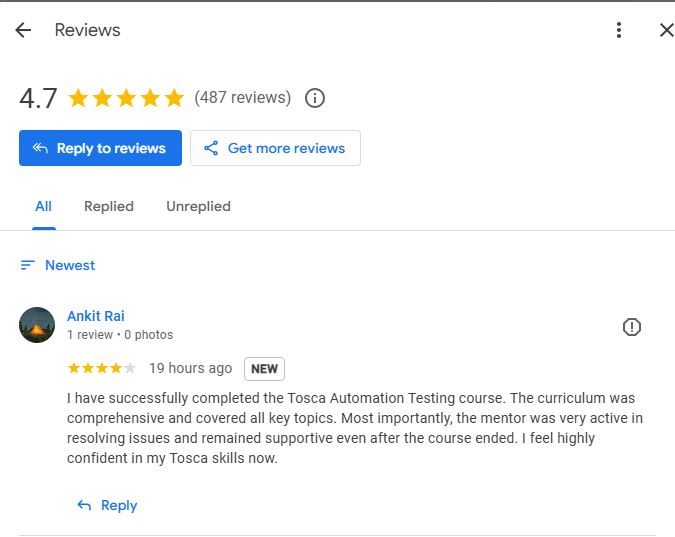
I have successfully completed the Tosca Automation Testing course. The curriculum was comprehensive and covered all key topics. Most importantly, the mentor was very active in resolving issues and remained supportive even after the course ended. I feel highly confident in my Tosca skills now. 👨 Rahul 👩 Sneha Agarwal 👨 Vivek Rathi 👩 Ritika Bheswal 👨 Arjun Kumar |
Salient Features:
- 30 Hours of Live Tricentis Tosca SAP Automation Training
- Lifetime Access to Recorded Tosca SAP Automation Sessions
- Industry-Recognized Course Completion Certificate
Who can enroll for this course?
- Manual Testers who want to move into Tosca SAP Automation
- QA Engineers looking to gain hands-on experience with Tricentis Tosca
- Automation Testers working on SAP GUI or SAP S/4HANA Fiori applications
- Professionals preparing for Tricentis Tosca Certification (AS1, AS2, TDS1, TDS2, AE1)
- API Testers who want to learn Tosca API Testing
- Freshers and IT Graduates aiming for a career in SAP Automation Testing
- Anyone interested in learning end-to-end SAP GUI and Fiori Automation using Tosca
What will I learn by the end of this course?
By the end of this Tosca SAP Automation Training, you will be able to:
- Understand SAP ERP fundamentals, SAP S/4HANA, and end-to-end business processes
- Navigate SAP GUI efficiently and work with T-Codes and SAP Tables
- Build a strong foundation in Tricentis Tosca automation tool and its architecture
- Design and develop model-based test automation (MBTA) for SAP applications
- Create, manage, and execute automated test cases using reusable modules
- Work with SAP UI elements, dynamic controls, tables, and grids using XScan
- Perform test case design (TCD) and implement data-driven testing
- Use Excel and TDS (Test Data Services) for managing dynamic test data
- Apply conditional logic, loops, and reusable components in automation
- Execute, debug, and troubleshoot SAP automation test cases
- Handle SAP pop-ups, navigation, and complex UI scenarios
- Perform API testing, JSON/XML validation, and PDF comparison using Tosca
- Implement distributed execution (DEX) for large-scale test runs
- Use Tosca Query Language (TQL) for efficient test asset management
- Apply self-healing automation techniques to reduce maintenance effort
- Integrate Tosca with qTest for test management and reporting
- Understand AI-driven test automation and Agentic AI concepts
- Work on a real-time end-to-end SAP automation project
- Prepare for Tosca certifications (AS1, AS2, TDS, AE1, SAP)
Course syllabus:
Module 1: Introduction to SAP & ERP Overview
- Overview of Enterprise Resource Planning (ERP) systems
- Introduction to SAP GUI, SAP S4 HANA – Fiori and its importance in the enterprise ecosystem
- Comparison of SAP with other ERP systems.
- Overview of SAP Modules (FI, CO, MM, SD, ,)
- Role of SAP in end-to-end business process management
Module 2: SAP Navigation, Processes & Technical Fundamentals
- Understanding the SAP GUI interface and navigation basics
- Explanation of End-to-End SAP Business Process Cycles
- Introduction to T-Codes (Transaction Codes) and how they drive SAP operations
- Working with SAP Tables – understanding data storage and relationships
- How SAP Modules interact and how automation applies across business processes
- The importance of test automation in SAP implementations and upgrades
Module 3: Introduction to TOSCA & SAP Automation
- Overview of TOSCA TestSuite – Core Features & Architecture
- Benefits of TOSCA for SAP Test Automation
- Model-Based Test Automation (MBTA) Principles
- SAP Test Automation Fundamentals – Key Challenges & Benefits
- Introduction to System Under Test (SUT) – SAP IDES Overview
Module 4: Installation & Workspace Setup
- TOSCA TestSuite Installation, Licensing, and System Requirements
- Creating and configuring a TOSCA Workspace
- Understanding Workspace Components
- Installing and Configuring SAP GUI for Automation
- Connecting SAP GUI with TOSCA
Module 5: Working with SAP Subset & XScan
- Importing and Exporting SAP Subset for Automation
- Introduction to XScan for SAP GUI
- Scanning SAP Screens and Identifying UI Elements
- Handling Dynamic Elements, Tables, and Grids in SAP
Module 6: Test Case Automation Basics
- Understanding Standard Modules in TOSCA
- Creating Reusable Modules and Test Case Structures
- Managing Parent-Child Relationships in Test Cases
- Creating and Executing Test Steps Using Modules
- Defining Actions and Step Sequences
Module 7: Running & Debugging Test Cases
- Executing Test Cases in ScratchBook
- Reviewing Execution Logs and Results
- Debugging Techniques and Failure Analysis
- Troubleshooting Common SAP Automation Issues
Module 8: Advanced SAP Automation Techniques
- Automating SAP Tables and Grid Views
- Working with Structured Data and Complex UI Controls
- Implementing SAP Toolbar, Menu, and Status Bar Modules
- Understanding Table Steering – “#” and “$” Usage Differences
- Handling Dynamic Text with XB Expressions
- Using Buffer and XBuffer for Dynamic Value Handling
Module 9: Handling SAP Pop-ups & Navigation
- Steering SAP Pop-up Messages, and Confirmation Dialogs
- Managing SAP SubToolBar for Enhanced Navigation
Module 10: Libraries & Reusability
- Creating and Managing Libraries in TOSCA
- Implementing Reusable Test Step Blocks (RTB)
- Working with Business Parameters for RTB
Module 11: Test Case Design (TCD) with TestSheet Creation
- Introduction to Tosca Test Case Design (TCD)
- Understanding Relationships Between TestSheets, Classes, and Instances
- Creating and Linking TestSheets for Data-Driven Testing
- Designing Complex Test Scenarios Using Conditions and Classes
- Best Practices for Scalable and Maintainable TCD Structures
Module 12: Excel Manipulation & Repetition Techniques
- Using Excel as an External Data Source in TOSCA
- Creating Dynamic Excel-Driven Automation Workflows
- Implementing Repetition for Iterative Test Execution
- Handling Complex Excel Operations (Read, Write, Looping Scenarios)
- Practical Exercises for Real-Time Business Scenarios
Module 13: Conditional & Looping Logic in Tosca
- Introduction to Conditional Statements in TOSCA
- Implementing IF and ELSE Conditions for Decision-Based Automation
- Understanding and Using Loops in TOSCA
- Implementing While and Do Loops for Iterative Workflows
Module 14: PDF Comparisons
- Compare and validate PDF content using Tosca
- Understand structured document validation
- Perform layout-sensitive and text-based comparisons
Module 15: Recovery & Cleanup Scenarios
- Implementing Recovery Scenarios in TOSCA
- Designing Cleanup Scenarios to Maintain Test Environment Stability
- Best Practices for Reliable Test Execution and Error Recovery
Module 16: TDS (Test Data Services & Test Data Management)
- Understand the architecture and purpose of TDS
- Create, publish, and manage dynamic test data
- Implement TDS for automated provisioning
Module 17: Distributed Execution (DEX)
- Understand Tosca Distributed Execution (DEX) concepts
- Learn DEX architecture with AOS & without AOS
- Understand Distributed Execution Agents
- Configure, monitor, and analyse distributed test execution results
Module 18: API Testing Using Tosca
- Introduction to API Scan in TOSCA
- Automating APIs using Tosca
- Creating API modules and test cases
- Validating responses, headers, and payloads
Module 19: XML Automation Using Tosca
- Read and scan XML structures using XScan
- Validate XML elements, attributes, and hierarchy
- Perform schema-based XML validations
Module 20: JSON Automation Using Tosca
- Automate JSON-based responses
- Use modules, buffers, and expressions for JSON validation
- Implement reusable JSON verification patterns
Module 21: Tosca Query Language (TQL)
- Introduction to TQL and its role in querying Tosca workspace objects
- Writing basic and advanced queries using conditions and logical operators
- Filtering Testcases, Modules, and Execution Results efficiently
Module 22: Self-Healing Automation in Tosca
- Introduction to self-healing concepts in Tricentis Tosca and its importance in reducing maintenance
- Understanding intelligent object identification and dynamic locator handling
- Handling UI changes automatically using AI-based healing mechanisms
- Implementing and validating self-healing strategies in real-time test scenarios
Module 23: qTest Integration with Tosca
- Introduction to Tricentis qTest and its integration with Tricentis Tosca
- Establishing a secure connection between Tricentis qTest and Tricentis Tosca server using API endpoints and configuration settings to enable seamless integration
- Syncing requirements, test cases, and execution results between Tosca and qTest
Module 24: Tosca Agentic AI Test Automation
- Introduction to Tosca Agentic AI Test Automation
- AI-based test case generation, prioritization, and predictive defect analysis
- Real-time use cases: autonomous testing, smart validation, and AI-driven optimization
Module 21: Tosca Query Language (TQL)
- Introduction to TQL and its role in querying Tosca workspace objects
- Writing basic and advanced queries using conditions and logical operators
- Filtering Testcases, Modules, and Execution Results efficiently
Module 22: Self-Healing Automation in Tosca
- Introduction to self-healing concepts in Tricentis Tosca and its importance in reducing maintenance
- Understanding intelligent object identification and dynamic locator handling
- Handling UI changes automatically using AI-based healing mechanisms
- Implementing and validating self-healing strategies in real-time test scenarios
Module 23: qTest Integration with Tosca
- Introduction to Tricentis qTest and its integration with Tricentis Tosca
- Establishing a secure connection between Tricentis qTest and Tricentis Tosca server using API endpoints and configuration settings to enable seamless integration
- Syncing requirements, test cases, and execution results between Tosca and qTest
Module 24: Tosca Agentic AI Test Automation
- Introduction to Tosca Agentic AI Test Automation
- AI-based test case generation, prioritization, and predictive defect analysis
- Real-time use cases: autonomous testing, smart validation, and AI-driven optimization
Module 25: Certification Guidance
- This module provides an overview of the Tricentis Tosca Product Consultant Certification Path, which includes AS1, AS2, TDS1, TDS2, AE1, and SAP Certification with TOSCA.
How can I enroll for this course?
OR
For any other details, Call me or Whatsapp me on +91-9133190573
Live Sessions Price:
For LIVE sessions – Offer price after discount is 300 USD 259 99 USD Or USD13000 INR 12900 INR 7900 Rupees
Sample Course Completion Certificate:
Your course completion certificate looks like this….

Reviews:
Important Note:
To maintain the quality of our training and ensure a smooth learning experience for all participants, we do not allow batch repetition or switching between courses.
To reiterate, moving from one course to another or shifting from one trainer to another (even if it is the same course) is not possible. Changing batches or trainers in any form is strictly not permitted.
We request all learners to attend the scheduled sessions regularly and make the most of their learning journey. Thank you for your understanding and continued support.